Log In
Start for freeStart
ShowcasePricingBlog
  1. Home
  2. Blog
  3. Workflow
4 min read
Best Way to Send Photos to Clients without Losing Quality

Oct 30, 2024

Best Way to Send Photos to Clients without Losing Quality

Contents

  1. πŸ“Š Photo Delivery Methods Comparison
  2. Why Quality Matters When Sending Photos
  3. Best Methods for Sending High-Quality Photos
    1. 1. Client Galleries (Best Choice! πŸ‘‘)
    2. When to Use Client Galleries
    3. Framebird
    4. 2. Cloud Storage Solutions
    5. 3. Email (Last Resort Option)
  4. Best Practices for Keeping Photo Quality Perfect
  5. Making the Right Choice for Your Business
  6. Final Tips for Success
  7. Conclusion

πŸ’‘ Quick Guide Summary

  • Client galleries are the #1 recommended method
  • Cloud storage works well for smaller projects
  • Email should only be used for single photos
  • Quality preservation starts at capture

πŸ“Š Photo Delivery Methods Comparison

MethodBest ForMax File SizeQuality LossEase of Use
Client GalleriesProfessional ProjectsUnlimitedNone⭐⭐⭐⭐⭐
Cloud StorageMedium Projects2-100GBMinimal⭐⭐⭐⭐
EmailSingle Photos25MBPossible⭐⭐⭐

Why Quality Matters When Sending Photos

Let's face it - you've worked hard to capture perfect photos for your clients. The last thing you want is for them to receive blurry, compressed versions that don't show your true talent!

Here's why quality delivery matters:

  • Makes your brand look professional
  • Helps you keep clients coming back
  • Increases the chances of referrals
  • Ensures clients get what they paid for

Did you know? A significant portion of photography business revenue comes from returning customers who are happy with their experience - including photo delivery quality!

Best Methods for Sending High-Quality Photos

1. Client Galleries (Best Choice! πŸ‘‘)

Think of client galleries as your own private photo museum. They're specially designed for photographers and offer:

  • Professional presentation with your branding
  • Zero quality loss when sharing
  • Easy collaboration with comments and annotations
  • Password protection for privacy
  • Mobile-friendly viewing
  • Track views and downloads of your shared photos

When to Use Client Galleries

  • Wedding photo collections
  • Portrait session delivery
  • Commercial photography projects
  • Any large set of professional photos

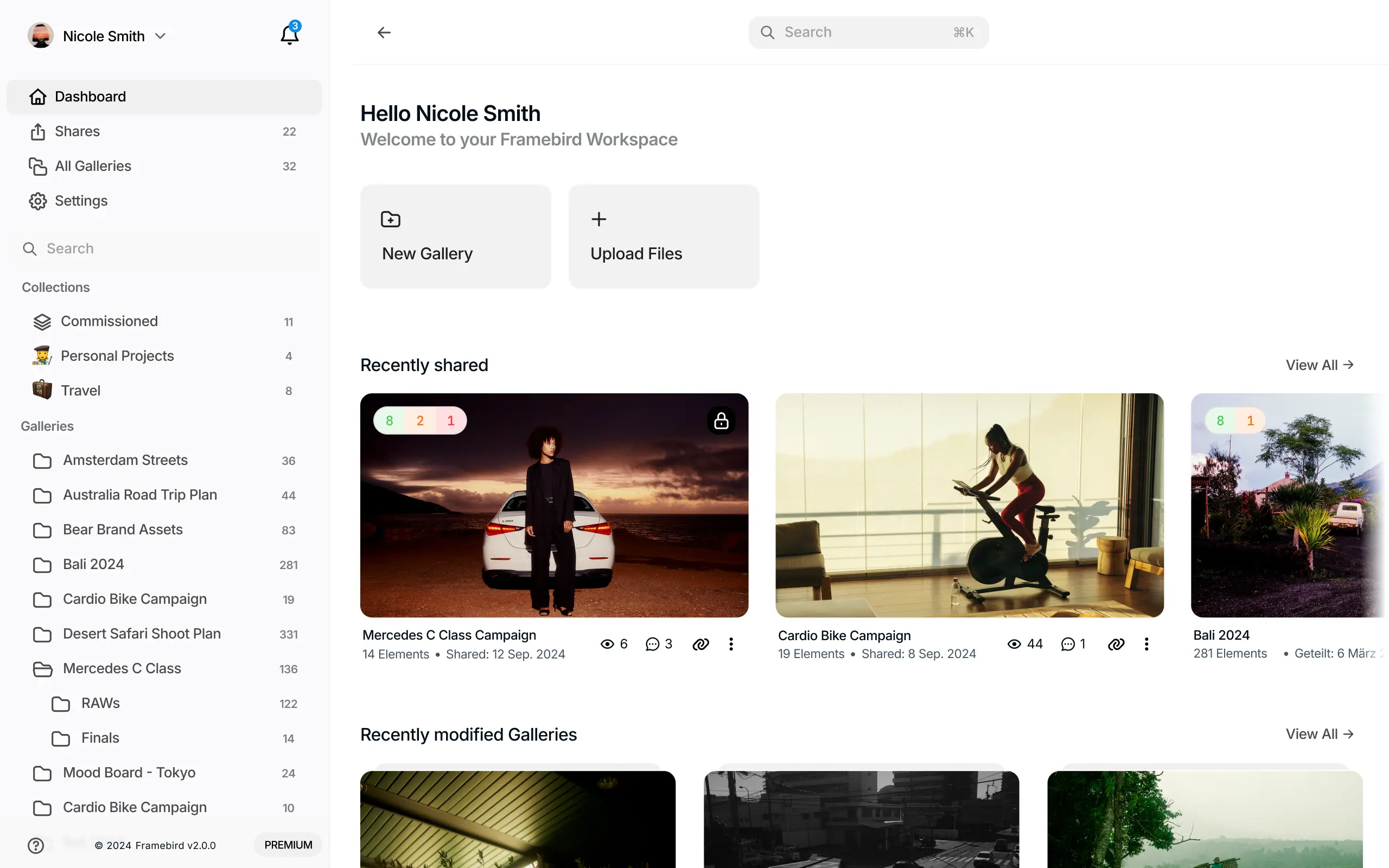
Framebird

  • Modern and intuitive user interface
  • Comment specific Photos and add Annotations to communicate better
  • Password protection for privacy
  • Mobile-friendly viewing and downloading

You can create a Framebird Account for free and try it out - the setup is super easy and takes under a minute!

Dashboard
Try now

2. Cloud Storage Solutions

While cloud storage services can be helpful for general file transfers, they may not be the best option for sending images, especially if you require detailed previews or specialized features for photography or videography work.

WeTransfer

  • Convenient for quick, one-off file transfers
  • Free for files up to 2GB
  • Not ideal for images: Lacks advanced image previews and features for managing visual media

Dropbox

  • Simple folder organization for ongoing projects
  • Quick sharing via links
  • Limited for image work: No specialized tools for photography or media collaboration; preview functionality is basic

Google Drive

  • Popular for general storage and sharing
  • Collaborative features are strong for documents
  • Not tailored for images: Preview quality is low, and lacks professional media management tools

3. Email (Last Resort Option)

⚠️ Only use email when:

  • Sending 1-2 photos
  • File size is under 25MB
  • Quality isn't super critical
  • Client needs immediate access

Best Practices for Keeping Photo Quality Perfect

1. Start with RAW Format

  • Captures all image data
  • Better editing flexibility
  • Highest quality possible

2. Optimize Camera Settings

  • Shoot at lowest ISO possible
  • Use appropriate aperture
  • Focus carefully

3. Smart Editing Workflow

  • Use professional editing software
  • Save in high-quality formats
  • Avoid multiple compressions

4. Before Sending Checklist

  • βœ… Check final resolution
  • βœ… Verify color accuracy
  • βœ… Test download speeds
  • βœ… Confirm file formats

Making the Right Choice for Your Business

Choose your delivery method based on:

  1. Project size
  2. Client expectations
  3. Budget
  4. Time constraints
  5. Security needs

Final Tips for Success

Whether you're sharing media with family and friends or handling large-scale transfers for enterprise-level projects, we’ve gathered the best available solutions in this article. By following these tips, you’ll ensure reliable, efficient, and professional delivery every time.

  • Always test your delivery method first
  • Ask for feedback from clients
  • Document your process for consistency
  • Keep up with new technology

Conclusion

Sending high-quality photos to clients doesn't have to be complicated. Client galleries are your best bet for professional results, while cloud storage makes a great backup option. Remember - your delivery method is part of your brand experience, so choose wisely!

Try Framebird

Framebird offers a simple workflow for quick and easy media delivery. Upload your files, create a gallery, and share it with your clients. It’s that easy.

Dashboard
Try now

The best of Framebird

Get the latest news and articles about Framebird. Maximum 1 email per month

You may opt out any time. Terms of Service and Privacy Policy

Get started for free

Get beautiful media sharing set up in less than 2 minutes. It's free forever.

Start for free
Free forever β€’Β No credit card required

Other Articles

Ultimate Photography Branding Guide: Boost Your Business - Featured image

Ultimate Photography Branding Guide: Boost Your Business

4 min read
Sep 23, 2024
Top 10 Mac Productivity Apps for Photographers in 2024 - Featured image

Top 10 Mac Productivity Apps for Photographers in 2024

4 min read
Nov 26, 2023
How to Share Photos Online Privately: A Comprehensive Guide - Featured image

How to Share Photos Online Privately: A Comprehensive Guide

7 min read
Nov 8, 2023
Choosing the Right Photo Size for Your Clients - Featured image

Choosing the Right Photo Size for Your Clients

7 min read
Nov 7, 2023

Product

  • Pricing
  • Help
  • Changelog
  • Showcase
  • Affiliate program

Company

  • Blog
  • About
  • Support

Tools

  • Image Converter
  • Image Compressor
  • Image Watermark
  • Image Viewer
  • EXIF Viewer

Comparison

  • vs Shootproof
  • vs Pixieset
  • vs SmugMug

Connect

  • Contact Us
  • X (Twitter)
  • Instagram
All systems operational
ImprintPrivacyTerms
Β©2026 Framebird
- built in berlin