You return from a trip with hundreds of photos spread across everyone's phones. A shared album sounds like the obvious place to collect them. But will your friends receive the original photos, and whose storage fills up when everyone contributes?
Apple Photos shared album quality now depends on which kind of album you use. Older Shared Albums reduce image dimensions. Apple's new experience, introduced with iOS 27, supports full-resolution photos and videos in their original formats. The old advice that every Shared Album reduces quality is out of date. Apple Support
That change makes the choice more interesting. Before collecting a wedding, holiday, or client shoot, check the album type, storage rules, and how people will download the files.
Information checked on September 22, 2026.
Do Apple Shared Albums reduce photo quality?
For albums created in iOS 26 or earlier that have not been upgraded, yes: larger photos are reduced to 2048 pixels along their longest edge. Panoramas can reach 5400 pixels wide. Videos are limited to 15 minutes and delivered at up to 720p. Apple also cautions that downloaded content may not carry the same information as the original. These albums should not be treated as lossless copies of your source files. Apple Support
Here is the distinction that matters:
| Album experience | Photo and video quality | iCloud storage responsibility |
|---|---|---|
| Older Shared Album, not upgraded | Reduced photo dimensions and video resolution | Shared items do not count against your iCloud quota |
| New, regular Shared Album in version 27 | Original formats at full resolution | Album owner, including files added by other people |
| Older album upgraded to the new experience | Newly shared items use original resolution | New additions count toward the owner; existing items remain exempt |
Apple Support and Apple Support
Full resolution describes image dimensions. It is not, by itself, proof that a downloaded file is byte-for-byte identical to your camera file. If exact preservation matters, compare the actual download with the file you uploaded.
How Apple Photos Shared Albums work
Apple Photos is the app you use to view and organize your library. Shared Albums provide a separate sharing workflow: create an album, choose photos and videos, and invite people to participate. The owner controls whether participants can add photos. Sharing uploads a copy, and someone who saves a shared item into their own library can retain it after the album is deleted. Apple Support
The shared media lives in iCloud. It is not simply a link back to a photo that exists only on the contributor's phone. Apple says shared items remain in iCloud until they are deleted by the owner or contributor, or the album itself is deleted. Apple Support
Be careful with the similar names. iCloud Shared Photo Library is a different feature. It supports you and up to five other people. Contributions move from the Personal Library into the Shared Library, where participants can add, edit, and delete content. The person who creates that library supplies its iCloud storage. Apple Support
Do Shared Albums count toward iCloud storage?
The answer used to be a straightforward no. It now depends on the album.
Older Shared Albums remain quota-exempt. For new regular albums, the owner supplies the storage, including for other people's contributions. If you create an album and friends add photos, the shared content counts toward your allowance.
There is also a temporary-album exception: these albums do not count toward iCloud storage and can contain up to 5000 photos and videos. Apple says a temporary album is deleted after 30 days. Apple Support and Apple Support
Keep three things separate when planning your storage: the shared collection, your personal photo library, and files downloaded onto your devices. Originals you keep in your own iCloud Photos library still use your storage. Optimize Storage can reduce the space used on your device while iCloud retains the full-resolution files. A quota exemption for an album is not a promise that every copy of those photos takes up no space. Apple Support
Why older shared photos can look worse
Consider a 4032 × 3024 photo. Reducing its longest edge to 2048 pixels while preserving its proportions produces a 2048 × 1536 image. That is about 3.1 million pixels instead of 12.2 million, roughly a quarter of the original pixel count.
That does not translate into a universal percentage of perceived quality. It does mean less detail is available when you crop, enlarge, or print the image. A small on-screen preview can hide the difference.
The practical problem often appears later. Someone wants a close crop of a group portrait or a full-page image for a photo book, and the shared copy is the only version they kept.
Users have raised this concern for years. An Apple Community discussion from August 2025 describes exactly that frustration after a group holiday. It is evidence of a user's experience, not an official statement of Apple's plans. Apple Community
Our view at Framebird: the older limits make those albums a poor choice when preserving detail is the priority. But calling the whole feature abandoned would now be unfair. Apple's documented update addresses the resolution restriction.
Can upgrading an album recover the original quality?
Apple says older albums remain unchanged until upgraded. On a supported iPhone, open the album, use the More menu, and select Upgrade Shared Album. Participants can use updated software or open the upgraded album on iCloud.com. Apple's promise of original resolution applies to newly shared photos and videos. Apple Support
Do not assume that upgrading reconstructs detail missing from an old shared copy. For important images, retrieve the originals from the people who took them and add those files again.
The same principle applies when moving to another service. Uploading a reduced copy to Framebird, a cloud folder, or a new Apple album cannot bring back the pixels that were removed. Start with the best source file you have.
Can iPhone and Android users share the same album?
Imagine a trip where some friends use iPhones and others use Samsung or Google Pixel phones. Saying that Android users cannot participate in Apple photo sharing is now too broad. The album type matters.
- Older Shared Albums: the owner can enable Public Website so Android friends can view photos in a browser. That viewing link does not give them the new browser contribution workflow.
- New or upgraded Shared Albums: Android friends can join through the album link and add photos in the browser, without an Apple Account or Apple device. The owner must allow photo contributions and may require approval to join. Feature availability can vary by country or region.
This is access to a shared album on the web, not the same experience as managing an iPhone's photo library in the Photos app. Apple Support Apple Support
Google Photos is another cross-platform option for Android and iPhone. Its free 15 GB allowance is shared with Gmail and Google Drive, and Storage saver can compress photos or reduce resolution. Check the backup quality setting if preserving detail matters. Google Photos Help Google Photos Help
Framebird also works for mixed-phone groups: send everyone the same Share link, enable visitor uploads, and let iPhone and Android users contribute through their browsers. Choose it when you also want a Gallery with presentation, comments, and download controls. The upcoming iOS app will be an additional option; Android participants can use the browser.
Use Framebird to collect photos through a shared gallery
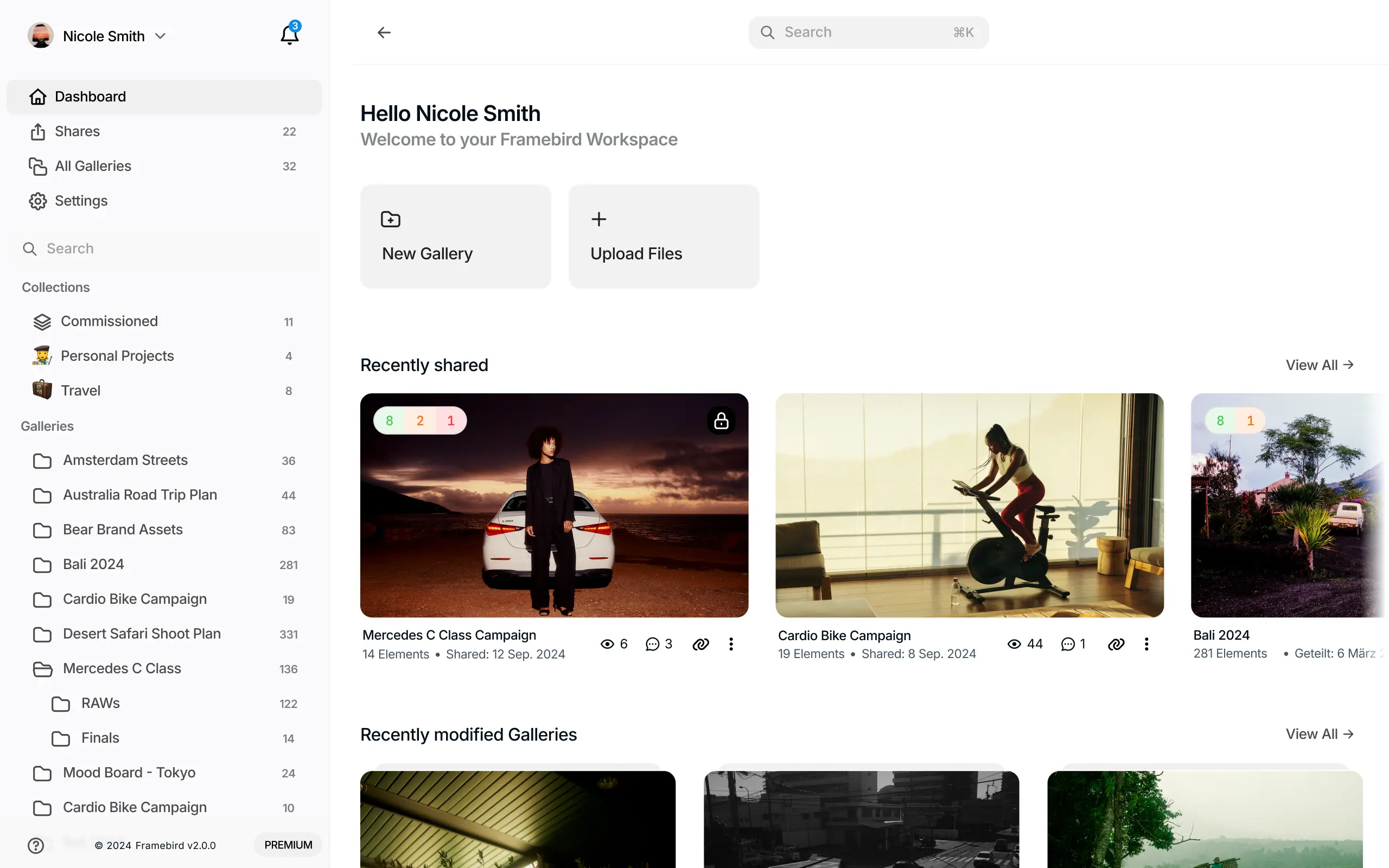
If you want a shared photo album with control over its presentation and how people contribute, Framebird offers that workflow through Galleries and Shares.
A Gallery organizes your photos. A Share presents them through a link you can send to friends, clients, or collaborators. You can let visitors upload their own files directly in the browser.
The workflow is straightforward:
- Create a Gallery for your trip, event, or project and add your photos.
- Create a Share containing the Gallery.
- Enable visitor uploads and choose which Galleries can receive files.
- Set the upload limit and configure access and download permissions.
- Send the Share link so everyone can view the collection and contribute.
Framebird also provides password protection, expiry settings, comments, and presentation themes. Those controls are useful when collecting photos is only part of the job and you also need to organize, review, or deliver them. See Framebird's client gallery features.
For quality-sensitive delivery, check the Share's maximum download resolution. Download a sample through the visitor view and compare its dimensions and appearance with your uploaded file. Judge the downloaded image rather than a thumbnail or screenshot. Our photo delivery guide explains this check in more detail.
An upcoming Framebird iOS app will also let you contribute photos from your iPhone. Browser uploads are available today; the iOS app is forthcoming.
Which sharing option fits your group?
Choose based on the collection you need to create:
| Your priority | What to consider |
|---|---|
| Keep using an older Apple album | Check whether its reduced-resolution copies are sufficient for the intended use |
| Stay in Apple Photos and share at full resolution | Use the new experience and check the owner's available storage |
| Collect files in a gallery with presentation and review controls | Consider a Framebird Share with visitor uploads enabled |
| Deliver files for printing or further editing | Start with the originals and verify a recipient-side download |
For a family collection already centered on Apple Photos, the updated feature is worth considering. For a project that needs a designed gallery, browser contributions, comments, and controlled downloads, Framebird is worth a closer look.
Give everyone one place to contribute.
Frequently asked questions
Are Apple Shared Albums lossless?
Older albums reduce larger images. The new experience stores full-resolution media in its original formats. Do not confuse that wording with an independently verified byte-for-byte guarantee.
Does upgrading an older album make all its photos full quality?
Apple specifies original resolution for newly shared items after an upgrade. Retrieve the original files if you need detail missing from earlier uploads.
Can friends add photos to a Framebird shared gallery?
Yes, when the Share owner enables visitor uploads. Contributors use the browser, and the owner chooses allowed destinations and the upload limit.
Can I recover quality by moving an old shared photo to Framebird?
Moving the file preserves only the information it already contains. Ask the photographer for the original before uploading it to a new gallery.